| How to send win popup message in Windows 10? |
|
|
|
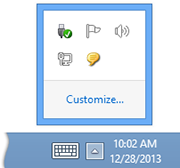
2. Right-click the Messenger icon located in the taskbar notification area, and then click Restore. |
|
|
|
|
|
|
|
|
|
|
|
|
 Open Main Window


Last Version: 12.0 
Release Date December 7, 2023 Supported OS: Win2000, XP, 2003, 2008, Vista, Windows 7, Windows 8, 8.1, Windows 10, Windows 11, Android, Mac OS X Networks: Intranet, LAN, WAN (TCP/IP required) Language Pack: Bosnian Croatian Czech Danish Dutch English Finnish French German Greek Hungarian Italian Indonesian Macedonian Malay Portuguese (Brazilian) Serbian Spanish Turkish |
